The hubs are configured and deployed using locally defined helm charts. Because each hub type can be described by a helm chart, a hierarchy of hub types can be built and this makes development and usage easier.
The graphic below, shows the relationship between the hub helm charts and the other config files and how they are merged together when deploying a hub.
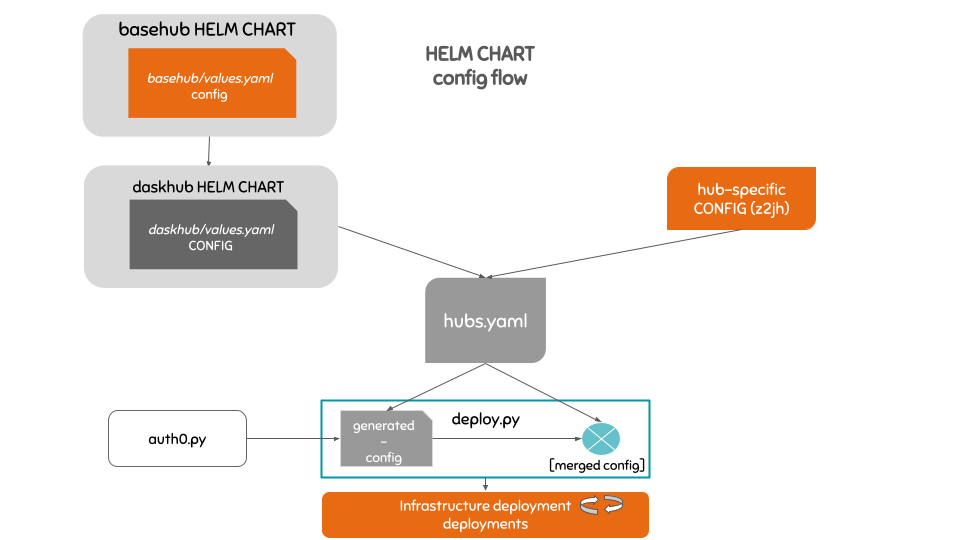
Currently there are two hub helm charts available:
basehubThe basehub helm chart is the chart that the other hub helm charts “inherit” and configure. It provides a base JupyterHub, user storage and culling configuration that satisfies most of the infrastructure usage requirements.
daskhubThe daskhub helm chart helps deploying dask-enabled hubs.
Installs dask-gateway
Defaults to using a PANGEO image
Enables outgoing SSH
Use the helm charts to deploy a new hub
To deploy a new hub, you only need to add a new *.values.yaml file to the appropriate cluster folder file under config/clusters, and add a new entry to the hubs key in that cluster’s cluster.yaml file.
This configuration file allows specifying options like the type of helm chart to use for the hub being added,
the hub domain, how the JupyterHub landing page will look like and authentication preferences.
The helm charts are structured in a hierarchical model. The jupyterhub helm chart is a subchart of the basehub chart and the basehub chart along with the dask-gateway one are subcharts of the daskhub.
Visual of the helm-chart hierarchy:
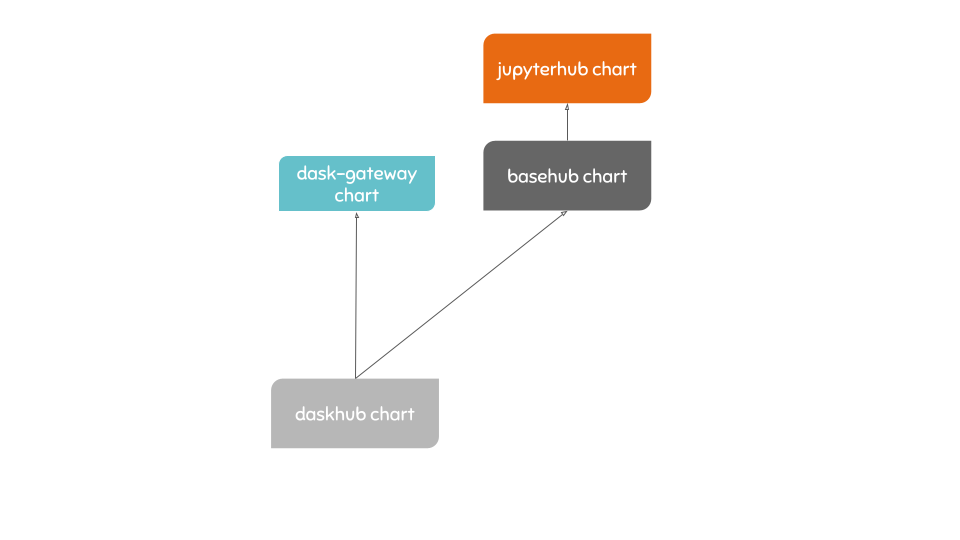
This hierarchy is the reason why when adding a new hub using the daskhub
specific configuration in a *.values.yaml file needs to be nested under a basehub key, indicating that we are overriding configuration
from the basehub/jupyterhub parent chart.
Read more about subcharts and how to configure them in the Helm docs.